Ask Claude or ChatGPT. Your posts get made in WedSchedulePro.
Connect the AI assistant you already use. Ask for a carousel from Saturday's best photos, better captions for your queue or the venue and florist added to your credits, and it does the work in your account, with your photos and our design tools. Nothing goes out until you say yes.
It works where you already are
You already have Claude or ChatGPT open. Now it can reach your galleries, your designs and your queue. Ask in plain words, the way you'd ask an assistant, and it uses the same tools you use in WedSchedulePro.
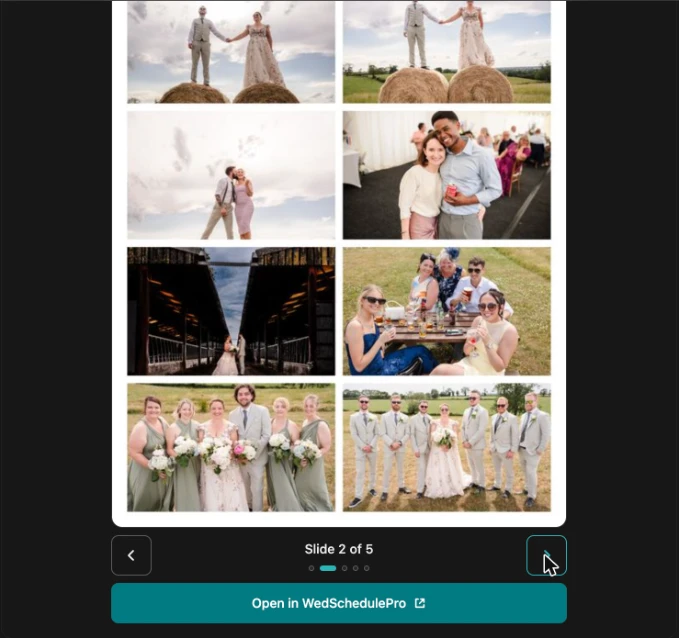
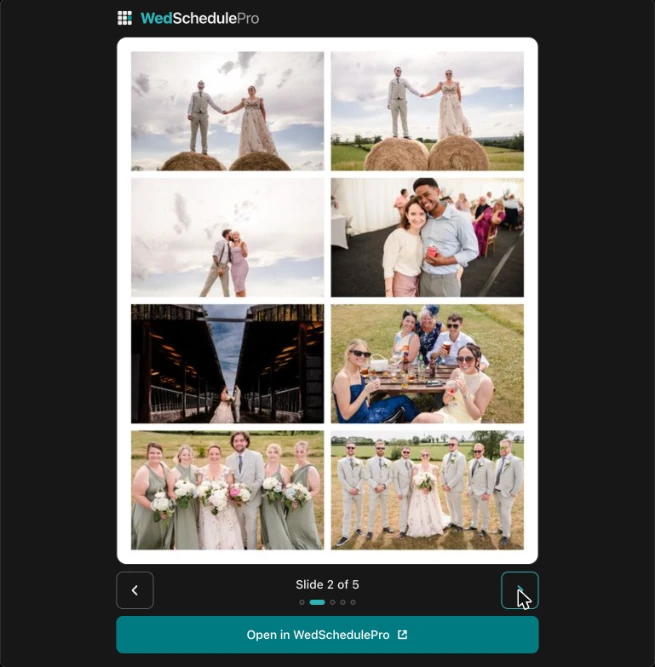
See the carousel in the chat
Ask for a carousel and the slides open right there in the chat, full size. Swipe through, ask for changes, and open it in WedSchedulePro when it looks right.
It asks before anything goes out
Your assistant drafts. You decide. It asks in the chat before it schedules, publishes or deletes anything, and whatever it schedules waits for your approval in WedSchedulePro. You can see everything it did in Settings, and disconnect it whenever you like.
What you can ask
Take the four- and five-star photos from Saturday's wedding and make a carousel.
It finds the gallery, picks the photos, lays them into your template and shows you the slides.
Show me the carousel we made yesterday.
It finds the design and opens the slides right there in the chat.
Write captions for the first-dance and confetti photos and save them as drafts.
It writes them in your brand voice and saves each one as a draft for you to check.
Go through my Instagram queue. Improve the weak captions and fill in any that are missing.
It shows you each new caption next to the old one and saves only after you say yes.
Schedule that draft for Saturday at 7pm.
It confirms the time and account with you, then schedules it. It waits for your approval here unless you've turned that off.
What's going out this week?
It reads your calendar and queue and tells you what's going out, and when.
Find the product shots from Tuesday's brand shoot and tag them spring launch.
It finds the photos and tags them, so you can pull them up again in your library.
Five-star these three and reject the blurry ones.
It rates and rejects them in WedSchedulePro. Your Lightroom ratings stay as they are.
Look up the venue, florist and band from Saturday's wedding and add any I don't have, with their Instagram handles.
It searches the web, shows you what it found and adds them after you say yes.
Connect in four steps
https://wedschedule.pro/mcp- Copy the address above.
- In Claude or ChatGPT on the web, add it as a custom connector.
- Sign in to WedSchedulePro and approve the connection.
- Start a chat, switch WedSchedulePro on, and ask for something. Try: "What's going out this week?"
The full steps for Claude and ChatGPT, with what to click in each, are in our help guide. Once you're signed in, the same steps are in Settings, under AI agents.
See how to connect- Which assistants work?
- Claude and ChatGPT, on the web. You connect your own account; we don't supply the assistant.
- Do I need a paid Claude or ChatGPT plan?
- Claude: any plan, including free Claude, which allows one custom connector. ChatGPT: OpenAI says your plan and workspace decide whether you can add one, and on some plans it can only read. It worked for us on ChatGPT Plus.
- Which WedSchedulePro plan?
- Solo and up. It's in early access now: switch on Early access in Settings to try it.
- Does it work on my phone?
- Not yet confirmed. We're testing the phone apps now. For the moment, use Claude or ChatGPT on the web.
- Will it post without asking me?
- No. It asks in the chat before it schedules, publishes or deletes anything, and what it schedules waits for your approval in WedSchedulePro.
- Does the AI make or change my photos?
- No. It works with your own photos and our design tools: it picks, lays out and frames them. It never generates images.
- Can it see my other businesses or workspaces?
- No. It works in the one workspace you approved, and only while you stay connected.
- What happens to my data?
- What your assistant reads from WedSchedulePro goes to Claude or ChatGPT under your own account's terms with them. Check your assistant's privacy settings. OpenAI, for example, says it may use what apps share to improve its models on Free, Plus, Go and Pro plans unless you turn "Improve the model for everyone" off.
Join the waitlist, over a wedding send-off photograph by Sky Photography, teal-washed.
Your next month of posts is in a gallery you’ve already delivered.
We'll email you once, when you can sign up.
Something went wrong — please try again.
You’re not just first in line — you’ll help call what gets built next.